Install OreMind
Connect to an existing Java server with Docker. Add --full-stack if you need PaperMC and Geyser too.
git clone https://github.com/christopherdeck/oremind.git
cd oremind
bash scripts/install-linux.sh
39 MCP tools let Claude — or anything that speaks MCP — control Mineflayer bots, auto-assign shared work, recover fleet metadata safely after restarts, and stream live Minecraft events.
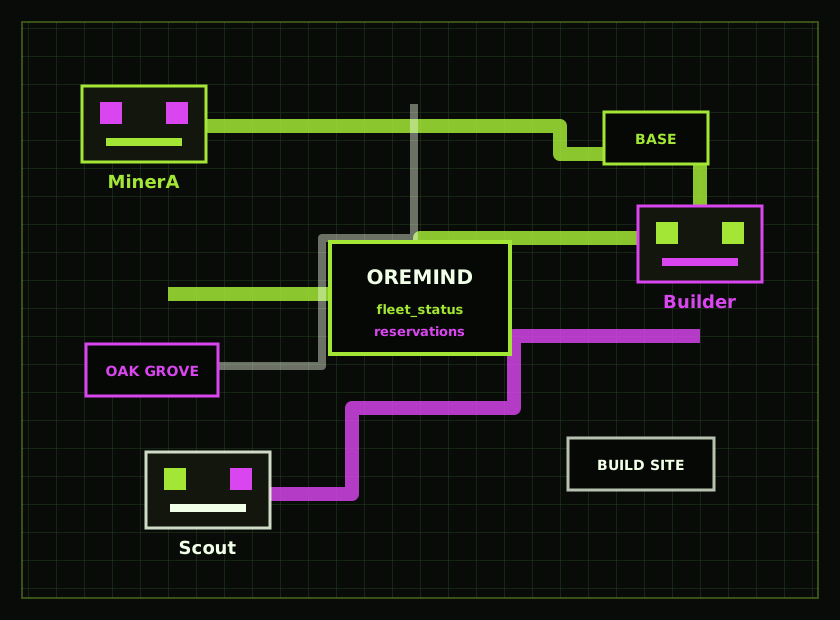
OreMind now includes a process-local fleet coordinator. Agents can inspect one sanitized read model, auto-assign gather/build work to the least-loaded eligible bot, register shared waypoints, reserve known mutations, and opt movement into bounded corridor admission before Mineflayer receives a goal.
Bearer-authenticated SSE with bounded replay, heartbeat checks, and an explicit reset when a client must reconcile.
OreMind stays on your machine, binds to loopback by default, and generates a bearer token during installation. These four steps complete the path from install to a verified client connection.
Connect to an existing Java server with Docker. Add --full-stack if you need PaperMC and Geyser too.
git clone https://github.com/christopherdeck/oremind.git cd oremind bash scripts/install-linux.sh
Docker installers save the generated credential in .env. Bare-metal installs use /etc/default/minecraft-bot-mcp.
grep '^MCP_AUTH_TOKEN=' .env
Clients that accept URL-and-header configuration can use this shape. The exact settings file varies by client.
{
  "mcpServers": {
    "oremind": {
      "url": "http://127.0.0.1:3100/mcp",
      "headers": {
        "Authorization": "Bearer YOUR_TOKEN"
      }
    }
  }
}
Wait for readiness — not just process liveness — then call minecraft_bots from your MCP client before issuing actions.
curl -s http://127.0.0.1:3100/ready \
  -H "Authorization: Bearer YOUR_TOKEN"
Illustrative dashboard preview showing the position, health, task, and guard-state telemetry exposed by OreMind.
/health confirms the HTTP process is alive. /ready stays unavailable until the configured bot has actually spawned in Minecraft.
Per-bot queues default to 256 steps, script batches stop at 128, and overflow is rejected atomically instead of silently overloading a bot.
Known gather/build and reserved movement collisions return FLEET_RESERVATION_CONFLICT, while exhausted auto-assignment returns FLEET_NO_ELIGIBLE_BOT.
/api/events keeps a bounded replay window for chat consumers. A missed cursor returns an explicit reset, so the bridge reconciles through /api/status instead of replaying stale history.
No. The recommended Docker install connects OreMind to an existing Java server or a single-player world opened to LAN. The full-stack option can add PaperMC, Geyser, and Floodgate when you are starting from scratch.
Yes. Bots connect as Java clients through Mineflayer, while Geyser and Floodgate let Bedrock players join the same world from phones, consoles, and Windows.
Do not expose it directly. OreMind binds to loopback by default; for remote access, keep bearer authentication enabled and use an SSH tunnel or authenticated TLS reverse proxy with an explicit origin allowlist.
Any client that supports MCP Streamable HTTP and lets you send an Authorization header can connect. Client-specific configuration filenames vary.